March 12th, 2026
Improved
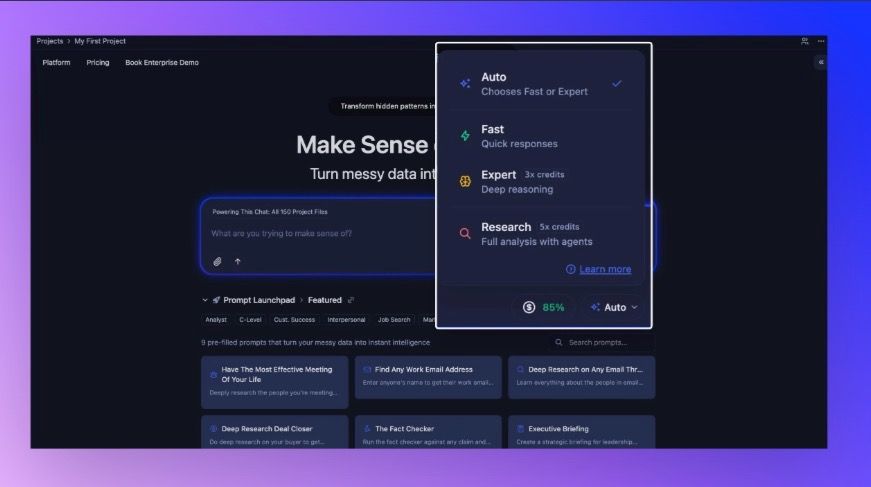
Simplified Chat Modes
We’ve been working how Storytell decides how to answer. This release introduces an improvement to Chat Modes—so you can choose speed, depth, or full research in one click—and makes the default behavior smarter when you don’t want to think about it at all.
✨ New: Chat Modes (Auto, Fast, Expert, Research)
You can now pick how Storytell responds: let Storytell choose, or force Fast, Expert, or Research.
Read more about it here: Chat modes
Until now, the system made a single style of response for every prompt. Sometimes you want a quick answer; sometimes you want the model to really dig in. We’ve added four modes you can switch between right in the prompt bar—no settings dive required.
What changed for you
Auto — Storytell picks Fast or Expert based on your prompt.
Best for most days: you get a sensible default without choosing anything.
Fast — Quick answers, no extended “thinking,” all the usual tools (web search, your Knowledge, charts, etc.) but no agents.
Best when you want speed.
Expert — Stronger models and a bigger “thinking” budget. Same tools as Fast, no agents.
Best for complex or nuanced questions.
Research — Strongest models, highest thinking budget, and agents enabled (e.g. web research).
Best when you want the system to gather and synthesize information across sources.
Who it’s for: Anyone who uses Storytell. Power users get explicit control; everyone else can stay on Auto and get better defaults.
Where to find it: In any project, open SmartChat™ and look at the prompt bar (where you type). Next to the input you’ll see the current mode—Auto, Fast, Expert, or Research—with a dropdown. Click it, pick a mode, and your next message uses that mode. You can change it anytime before sending.

Credits: Fast uses the fewest credits per query; Expert uses more (e.g. 3×); Research uses the most (e.g. 5×). The mode selector shows relative cost so you can decide before sending. Auto only ever chooses Fast or Expert—it never auto-selects Research, so you only pay for Research when you choose it.