November 24th, 2025
New
Improved
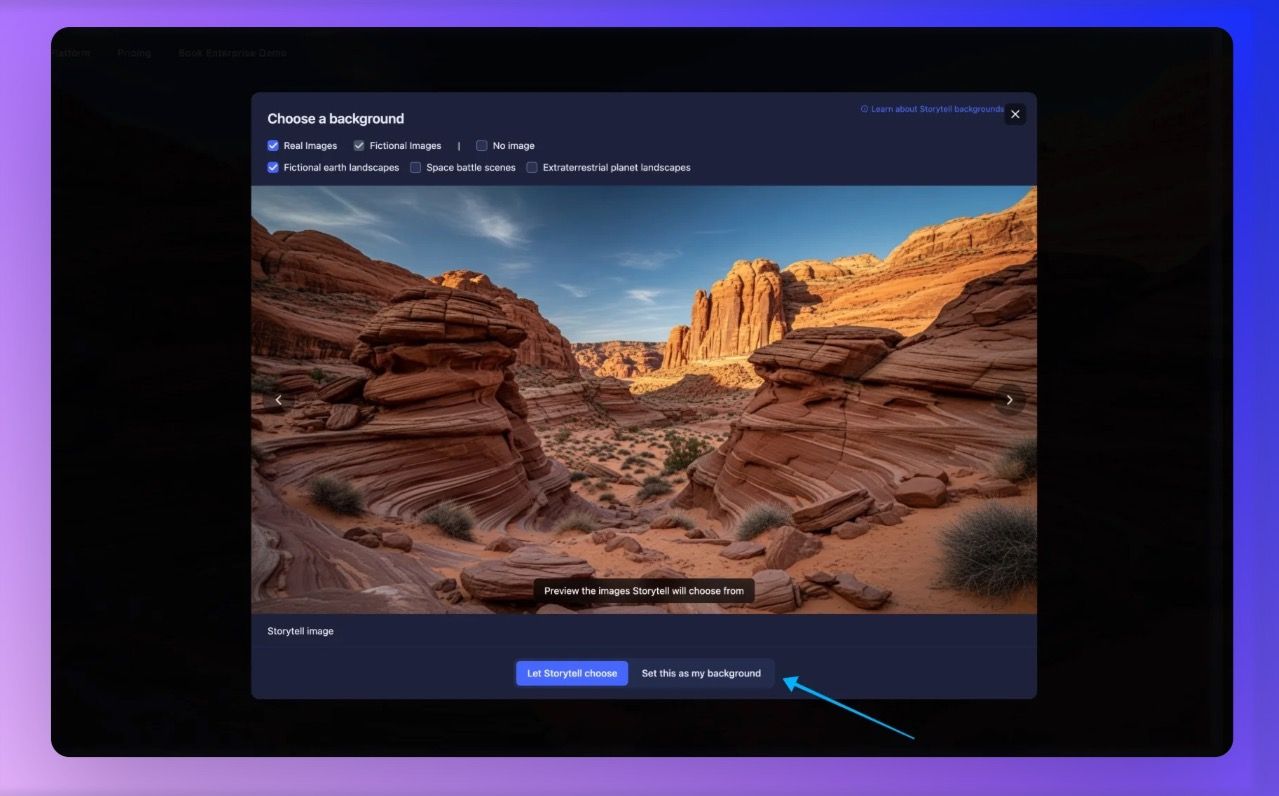
More ways to personalize Storytell
Personalize your workspace with curated backgrounds
Your Storytell workspace should feel like your workspace. We've added a beautiful collection of background images you can browse and set with just a few clicks.
Features:
Full-screen gallery: Browse high-quality background images in an immersive modal
Easy navigation: Arrow keys or on-screen controls to explore options
"Let Storytell Choose": We'll automatically rotate backgrounds for you
Instant preview: See how backgrounds look before committing
Why we built this: Personalization isn't just about functionality – it's about making Storytell feel like home. Whether you prefer minimalist patterns, nature scenes, or abstract art, your workspace should inspire you.
Get started: Change your Storytell background
Storytell now supports 20+ languages with automatic detection
Storytell now automatically detects your browser's language and adapts the entire interface – no settings to configure, no complicated setup.
Supported languages include:
European: Spanish, French, German, Italian, Portuguese, Dutch, Swedish, Norwegian, Danish, Finnish, Polish, Czech, Romanian, Greek
Asian: Japanese, Korean, Chinese (Simplified, Traditional, Hong Kong), Hindi, Bengali, Urdu, Thai, Vietnamese, Indonesian, Malay
Middle Eastern & Others: Arabic, Persian, Hebrew, Armenian, Russian, Ukrainian, Turkish, Filipino, Swahili, Kazakh
How it works: When you first visit Storytell, we detect your browser's primary language. If we support it, the interface automatically switches. You can always change languages manually from your account settings if you prefer something different.
Who benefits most: Global teams, non-English speakers, and anyone who thinks more clearly in their native language. We've heard from so many users about language barriers, and this removes that friction entirely.
Get started: Change your Storytell language